Arc0 MCP
One MCP endpoint per user, with tools scoped to their connections and your policies.
Every user in your project gets one MCP endpoint. Point any remote-MCP client at it — the agent you built, Claude, ChatGPT, Cursor — and it can only see and call what that user connected and what your policies allow.
The endpoint
https://mcp.arc0.ai/u/{user}{user} is the external id you passed when the user connected, for example u_8f2 in
production or test_001 in development:
https://mcp.arc0.ai/u/u_8f2There is no per-app or per-agent URL. One endpoint carries every app that user connected, and every agent that authenticates against it sees the same tools, filtered by whatever policy governs that agent.
Transport and auth
The server speaks the 2026-07-28 MCP spec over Streamable HTTP (streamable-http),
not the older HTTP+SSE transport.
Two ways to authenticate:
- OAuth, with dynamic client registration. The client registers itself against the endpoint and the user completes a sign-in — this is what Claude and ChatGPT do.
- A per-user key (
api-key), for clients that can't do an OAuth handshake. Generate one fromarc0.mcp.endpoint({ user })on your backend and hand it to the client directly.
Tool modes
A project sets one toolMode for its endpoints:
- Meta tools (
meta) exposes exactly two tools,search_actionsandexecute_action. The agent searches for what it needs and calls it by name. Use this when a user has many apps connected, or many actions enabled per app — most clients cap how many tools they'll hold in context, and two tools never hits that cap. - Every action (
direct) exposes one tool per action, named likegmail_send_email. Use this when a user's surface is small and fixed, or when your client can't reliably chain a search call before an execute call.
Most projects with more than a handful of apps enabled use Meta tools. Switch a project to Every action from the same page shown below.
What the agent sees
The tool list isn't static. It reflects, for this specific user, right now:
- which apps they connected, and whether that connection is
active - which scopes they granted on each one
- which actions your policy allows for the agent calling in
An action the user never granted, or that a policy denies outright, never appears as a
tool — the agent can't discover it to try. An action behind an ask rule appears, but
calling it holds the call for approval instead of running it; see
Approvals.
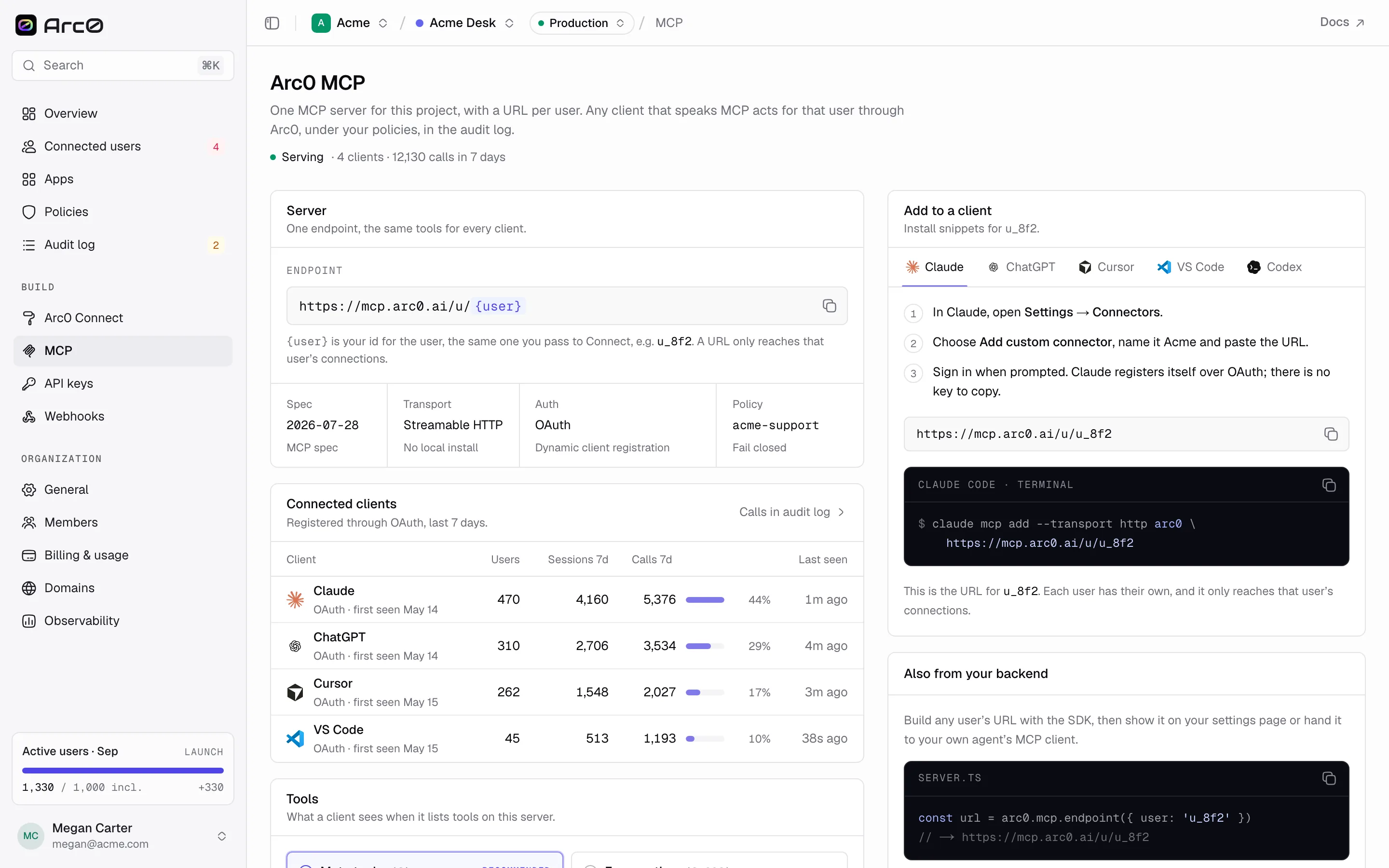
Connected clients
The same page lists every client that has signed in against this project's endpoints:
| Column | Meaning |
|---|---|
| Client | The MCP client, detected from its connection |
| Users | How many distinct users have connected this client |
| Sessions 7d | Sessions opened in the last 7 days |
| Calls 7d | Tool calls in the last 7 days |
| Last seen | Most recent activity |
A single user's own agents show up on their user page under the Agents tab.